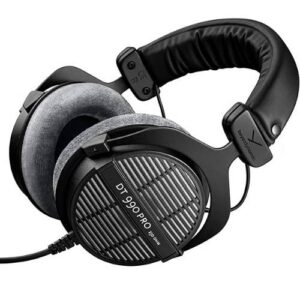
So, what headset does Ninja use? Tyler "Ninja" Blevins games with the Beyerdynamic DT 990 Pro — an open-back, studio-grade headphone that's been a staple on his streams for years. It's not a flashy gaming headset with RGB lighting. It's a serious audiophile pick that delivers incredibly detailed sound, and it's a big reason Ninja can pinpoint enemy footsteps with scary accuracy. If you're shopping for your next pair, our buying guides section covers dozens of top-rated options. But first, let's break down exactly why Ninja chose this headset and whether it's right for you.

The DT 990 Pro sits in a unique spot. It's built for studio monitoring and music production, yet pro gamers and streamers keep gravitating toward it. The open-back design creates a wide, natural soundstage — meaning you hear sounds positioned in space around you rather than compressed inside your head. For competitive gaming, that spatial awareness is everything. Ninja pairs these headphones with a separate microphone, which is standard practice among top streamers who want the best audio quality on both ends.
Below, you'll find a full breakdown of the DT 990 Pro's specs, setup tips, troubleshooting advice, and an honest cost analysis to help you decide if this is the right headset for your gaming setup.
Contents
How to Set Up the Beyerdynamic DT 990 Pro for Gaming
Getting the DT 990 Pro working for gaming takes a bit more effort than plugging in a USB headset. But once you dial it in, the audio quality blows standard gaming headsets out of the water. Here's what you need to do.
Choosing the Right Impedance
The DT 990 Pro comes in a 250-ohm version. Impedance (measured in ohms — basically how much power the headphones need) matters because it determines what can drive them properly:
- 250 ohm — Requires a dedicated headphone amp or audio interface. This is the version Ninja uses and most audiophiles recommend.
- Your motherboard's headphone jack won't push enough power. You'll get quiet, thin-sounding audio.
- Budget amps like the FiiO E10K or Schiit Fulla work perfectly for this impedance range.
Connecting an Amp or Audio Interface
Follow these steps to get everything connected:
- Plug the DT 990 Pro's 3.5mm cable into your amp or interface (use the included 6.3mm adapter if needed — check our guide to headphone jacks and plugs for help identifying yours).
- Connect the amp to your PC via USB.
- Open your system sound settings and select the amp as your default output device.
- In your game's audio settings, set the output to your amp and enable headphone mode if available.
- Adjust the volume on the amp — start low and increase gradually.
Pro Tip: Always set your in-game audio to "headphone" or "stereo" mode — not surround. The DT 990 Pro's open-back design creates natural spatial cues that virtual surround actually ruins.
Quick Upgrades for Ninja-Level Audio
The DT 990 Pro sounds great out of the box, but a few small tweaks can push your audio experience even further. These are low-effort, high-reward changes.
EQ Settings That Make a Difference
The DT 990 Pro has a noticeable treble spike (bright highs). For gaming, you want to tame that slightly and boost the low-mids where footsteps live:
- Use free software like Equalizer APO with the Peace GUI on Windows.
- Cut 8kHz by 3-5 dB to reduce harshness.
- Boost 500Hz–1kHz by 1-2 dB to thicken up footstep sounds.
- Leave the sub-bass (under 60Hz) flat — boosting it muddies directional cues.
Ear Pad Swaps and Comfort Mods
The stock velour pads are comfortable, but after extended sessions you might want more cushion:
- Dekoni Elite Velour pads — thicker memory foam, slightly warmer sound.
- Replacement pads snap on without tools. Pull the old ones off, press the new ones on.
- Replace pads every 12–18 months for hygiene and consistent sound quality.
Common DT 990 Pro Issues and How to Fix Them
The DT 990 Pro is reliable, but some users run into a couple of predictable issues. Here's how to solve them fast.
Headphones Sound Too Quiet
This is the number-one complaint from new owners — and it's almost always a power issue:
- No amp? That's your problem. The 250-ohm version needs an external amp. Period.
- Check that your amp is set as the default audio device in both Windows and your game.
- Make sure the volume isn't capped in Windows sound mixer — individual apps sometimes get turned down separately.
- Try a different USB port for your amp. Front-panel ports sometimes deliver inconsistent power.
Treble Feels Too Sharp
The DT 990 Pro's treble is famously bright. Some people love it; others find it fatiguing during long sessions. If it's bothering you:
- Apply the EQ cuts described in the Quick Upgrades section above.
- Switch to thicker ear pads — they absorb some high-frequency energy.
- Give yourself a break-in period. Many listeners find the treble less jarring after a week of regular use as your ears adjust.
Warning: If you're experiencing ringing in your ears after gaming sessions, your volume is too high. The World Health Organization recommends keeping headphone levels below 85 dB to protect your hearing long-term.
How to Keep Your DT 990 Pro in Top Shape
Beyerdynamic built the DT 990 Pro to last — the frame is spring steel, and nearly every part is user-replaceable. But you still need to take care of it. Here's a simple maintenance routine that'll keep your headphones performing for years.
Cleaning Routine
- Remove the ear pads weekly and brush off dust and skin flakes with a soft-bristle brush.
- Wipe the headband and frame with a slightly damp microfiber cloth.
- For deeper cleaning, dampen the velour pads with a mix of water and mild soap, then air dry completely before reattaching.
- Never use alcohol or harsh chemicals — they'll damage the velour fabric and degrade the foam underneath.
Proper Storage
- Use a headphone stand or hook to keep them off your desk. This prevents the cable from getting kinked.
- Avoid storing them in direct sunlight — UV degrades the padding material over time.
- Coil the cable loosely. Tight wrapping stresses the internal wires and causes shorts.
The DT 990 Pro's modular design means you can replace the ear pads, headband padding, and even the driver units yourself. Beyerdynamic sells all parts directly. If you value longevity, check out our picks for the most durable headphones on the market.
DT 990 Pro for Beginners vs Audiophile Gamers
Not every headphone is right for every listener. Here's an honest look at who the DT 990 Pro works best for — and who might want to look elsewhere.
What Beginners Should Know
If this is your first step beyond basic gaming headsets, the DT 990 Pro comes with a learning curve:
- You need an amp. That's an extra purchase and an extra device on your desk.
- There's no built-in microphone. You'll need a separate mic for voice chat and streaming.
- Open-back design means sound leaks out. Everyone nearby hears what you're listening to. Not ideal for shared spaces.
- The bright treble signature takes getting used to if you've only listened through consumer headphones with boosted bass.
If you want a simpler plug-and-play experience, a dedicated gaming headset under $150 might be a better starting point. Our best gaming headsets under $150 list has strong options that don't need extra gear.
Why Experienced Listeners Love It
For gamers who already appreciate good audio, the DT 990 Pro delivers in ways typical headsets cannot:
- The wide soundstage gives you a genuine competitive edge in FPS games — you hear exactly where enemies are.
- Detail retrieval is exceptional. You'll pick up subtle audio cues you never noticed before.
- It scales with better equipment. Pair it with a quality DAC/amp stack and the sound improves noticeably.
- Comfort during marathon sessions is outstanding thanks to the lightweight spring steel frame and soft velour pads.
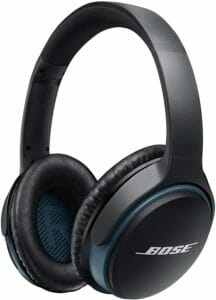
Pro Insight: Ninja uses a separate boom mic (not the headphone itself) for stream audio. If you're going the DT 990 Pro route, budget for a USB condenser mic or an XLR setup for the best voice quality.
Is the DT 990 Pro Worth Your Money?
Let's talk numbers. What headset does Ninja use, and what does it actually cost to replicate his audio setup? The headphone itself is reasonably priced for what you get, but the total investment depends on what gear you already own.
Price Comparison With Popular Gaming Headsets
| Headphone | Type | Price Range | Amp Required? | Built-in Mic? | Best For |
|---|---|---|---|---|---|
| Beyerdynamic DT 990 Pro | Open-back | $140–$170 | Yes | No | Competitive FPS, streaming |
| HyperX Cloud II | Closed-back | $60–$100 | No | Yes | All-around gaming |
| SteelSeries Arctis Nova 7 | Closed-back | $150–$180 | No | Yes | Wireless convenience |
| Sennheiser HD 560S | Open-back | $150–$200 | Optional | No | Balanced listening |
| Audio-Technica ATH-M50x | Closed-back | $120–$150 | No | No | Studio monitoring, travel |
Total Cost of Ownership
Here's a realistic breakdown of what you'll spend to build a Ninja-style audio setup from scratch:
- DT 990 Pro (250 ohm): ~$150
- Headphone amp (FiiO E10K or similar): ~$75
- USB condenser microphone: ~$50–$100
- Replacement ear pads (annual): ~$30–$50
- Total first-year cost: approximately $275–$375
That's more than a $70 gaming headset, no question. But the DT 990 Pro will outlast two or three cheaper headsets easily, and the sound quality isn't even in the same league. If you're serious about gaming audio and want gear that grows with you, this is a smart long-term investment. For more options at this level, browse our roundup of the best audiophile gaming headphones.
Frequently Asked Questions
What headset does Ninja use for streaming?
Ninja uses the Beyerdynamic DT 990 Pro (250 ohm) paired with a separate microphone. It's an open-back studio headphone known for its wide soundstage and detailed treble, making it excellent for competitive gaming and streaming.
Does the Beyerdynamic DT 990 Pro need an amplifier?
Yes. The 250-ohm version that Ninja uses requires a dedicated headphone amplifier or audio interface to reach proper volume and sound quality. Budget options like the FiiO E10K or Schiit Fulla work well.
Is the DT 990 Pro good for gaming?
It's excellent for gaming, especially competitive FPS titles. The open-back design creates a wide soundstage that helps you pinpoint directional audio cues like footsteps, gunshots, and ability sounds with precision.
Does the DT 990 Pro have a built-in microphone?
No. The DT 990 Pro is a headphone only — no microphone included. You'll need a separate mic for voice chat or streaming. Most pro streamers prefer this setup because standalone mics deliver much better voice quality.
Can people around me hear my DT 990 Pro?
Yes. The open-back design lets sound pass freely in both directions. People nearby will hear your audio, and you'll hear ambient room noise. This headphone works best in a private or quiet room.
How does the DT 990 Pro compare to typical gaming headsets?
The DT 990 Pro offers significantly better sound quality, wider soundstage, and superior comfort compared to most gaming headsets. The trade-off is no built-in mic, the need for an amp, and sound leakage from the open-back design.
Is the DT 990 Pro comfortable for long gaming sessions?
Very comfortable. The spring steel headband provides gentle clamping pressure, and the large velour ear pads fully surround your ears. Most users report wearing them for four or more hours without discomfort.
Are there cheaper alternatives to Ninja's headset?
If you want a similar open-back sound on a tighter budget, the AKG K240 and Philips SHP9500 are solid picks under $80. For a plug-and-play option with a mic, the HyperX Cloud II is a proven all-rounder at around $70.
Key Takeaways
- Ninja uses the Beyerdynamic DT 990 Pro (250 ohm), an open-back studio headphone prized for its wide soundstage and precise audio imaging in competitive games.
- You'll need a headphone amp and separate microphone to run this setup properly — budget roughly $275–$375 total for the first year.
- The DT 990 Pro outperforms typical gaming headsets in sound quality and durability, but its open-back design and bright treble aren't for everyone.
- Simple upgrades like EQ tuning and replacement ear pads let you fine-tune the listening experience without spending much extra.


About Simon B.
Simon here is an audiophile that loves to try out new audio equipment and loves to listen to different genres of music. Being an active student of Audio Electronics, He is more than capable of discussing different elements of headphones. A Powerful Music Can Change The Tone Of Your Heart, That Is The Real Power Of Music.
Get FREE Headset Gifts now. Or latest free Music Guide from our best collections.
Disable Ad block to get all the secrets. Once done, hit any button below